Antavo provides the tools to help you build a friend referral flow that lets customers share discount codes with their friends, encouraging them to shop with your brand. By combining features from the Coupons and Workflows modules, you can configure coupon details, automate coupon booking for the referrers, and connect the process to your own systems or Shopify. This helps you attract new customers through personal recommendations.
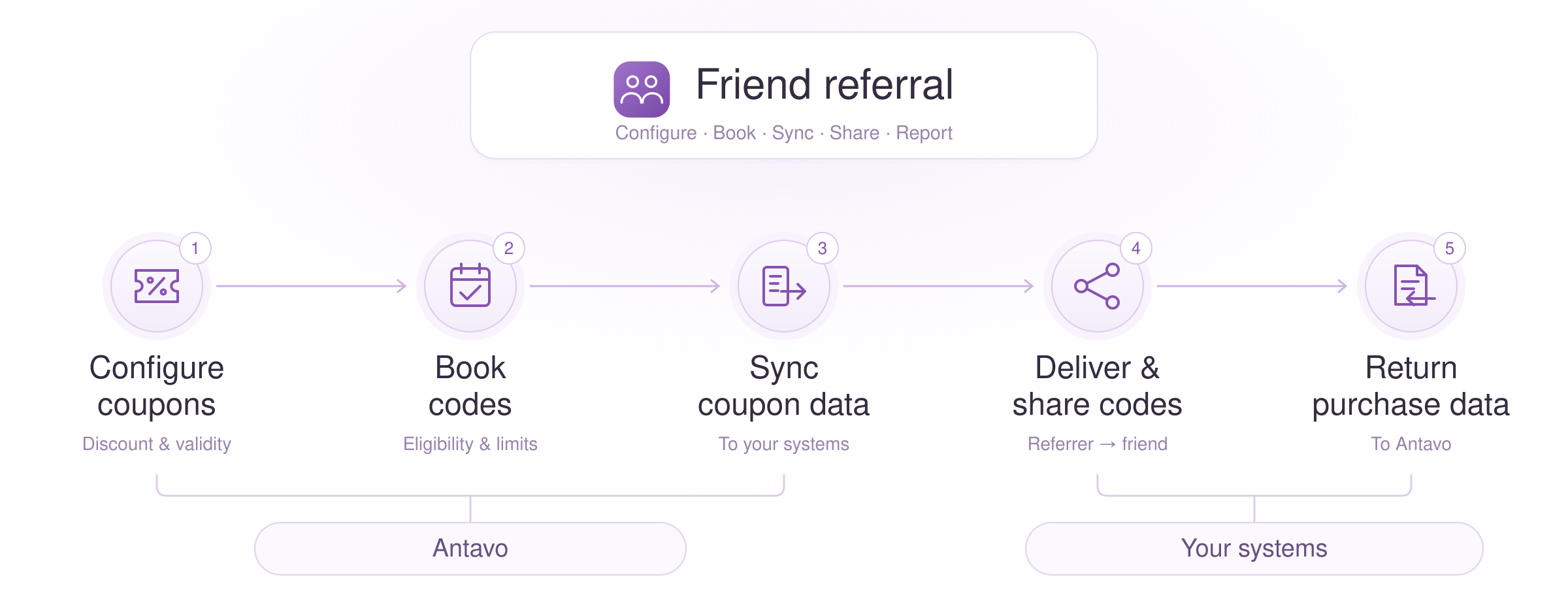
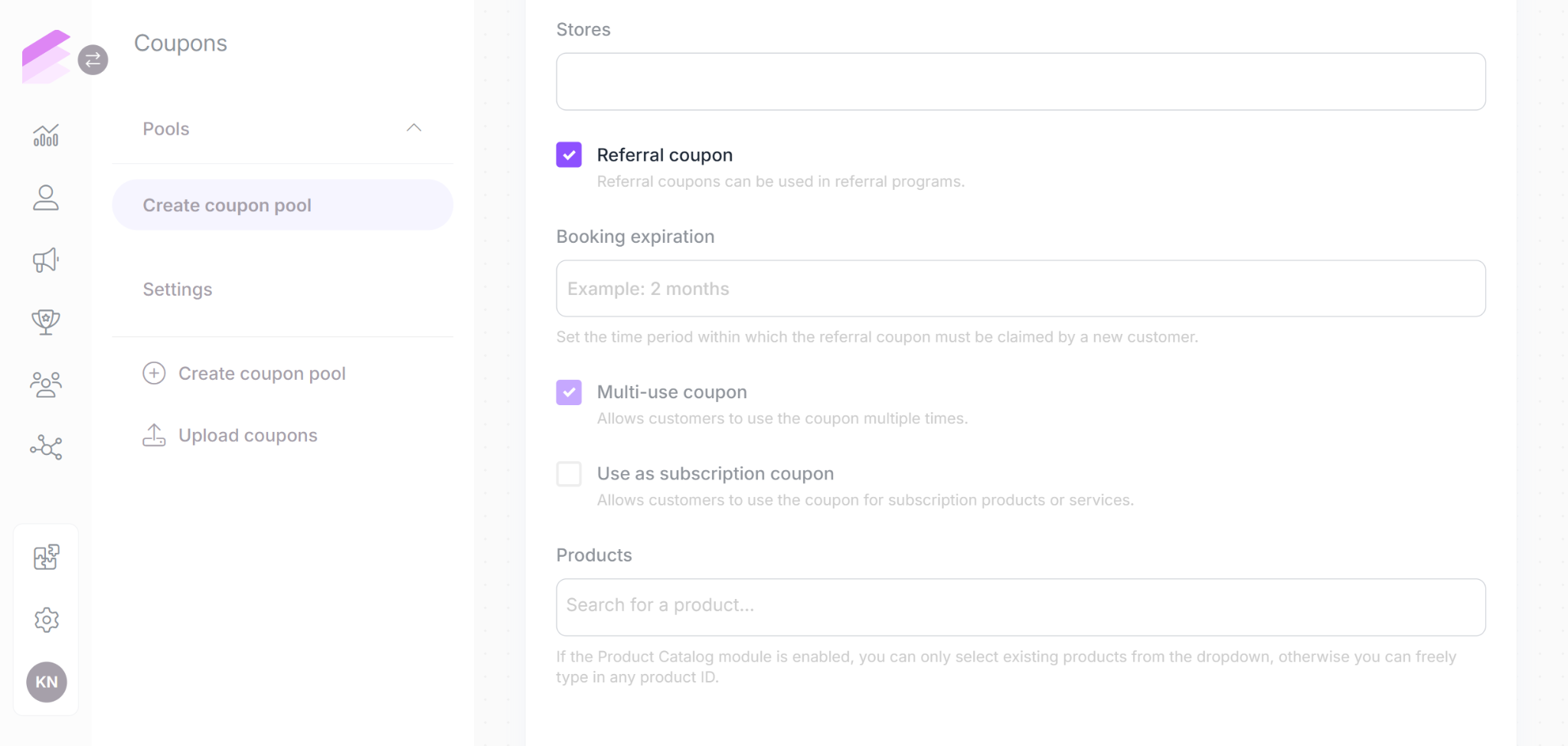
1. Prepare a referral coupon pool
Create a referral coupon pool using the Coupons module. Make sure you select Referral coupon when creating the pool, because this option cannot be enabled after saving. A referral coupon can also be a subscription coupon. Use this option when you want the shared code to provide a discount on subscription payments over one or more billing cycles.
2. Book coupons for eligible referrers
Create a workflow with the trigger and optional conditions that determine who receives codes.
Add Book referral coupons workflow action and configure the booking details
The customer the workflow runs for is the referrer. Booking records a Referral coupon booking event in the referrer’s event history, but does not assign the coupons to them for personal use. The referrer can share the codes, and invited customers use the discounts according to the rules configured in your store or other systems.
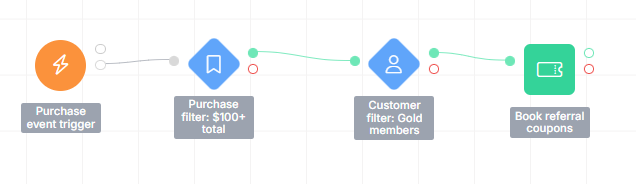
Booking reserves the coupons and removes them from the codes available for distribution from the selected pool.
3. Synchronize and distribute the codes
Connect your synchronization workflow actions to the booking action's success (green) output. Use the coupon and booking data to make the codes available in the systems that deliver or accept them.
Choose an action for the destination:
Sync multiple fields: update fields in your connected communication platform.
Trigger Marketing Communication or a platform-specific event sync action: send an event with coupon and booking data to your integrated communication platform.
Webhook message: send data to an endpoint in your system.
Use the coupons workflow variable for the booked coupons and referral_coupon_booking for the booking result when mapping values to the destination fields or payload. Include the codes and the details your implementation needs, such as discount settings, usage limits, booking validity, and information linking the codes to the referrer. See Book referral coupons node description for the available variables and fields.
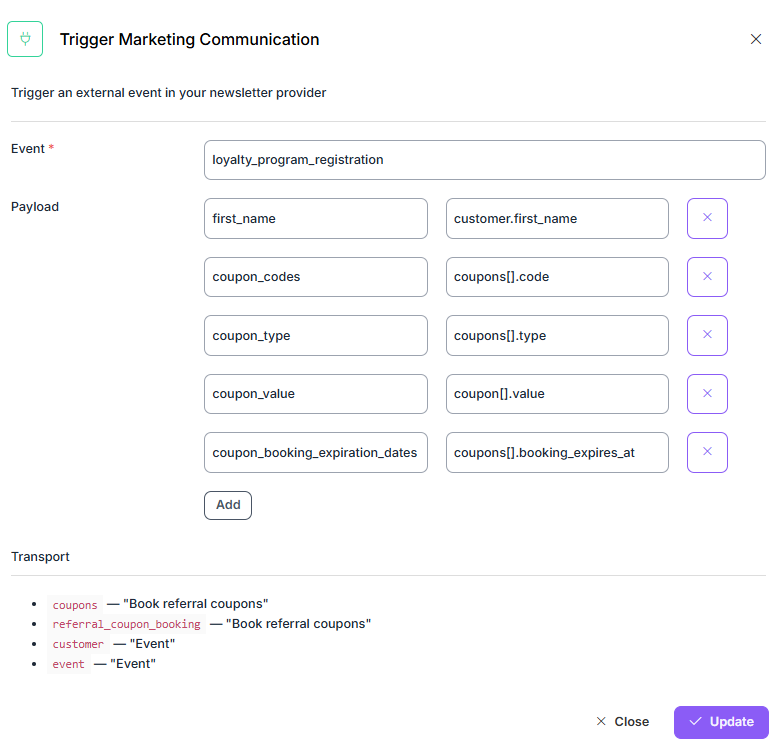
Example: The Trigger Marketing Communication action sends the referrer’s first name and the codes, types, values, and booking expiration dates of their booked referral coupons to the connected marketing platform.
Your communication platform can use these values in a message to the referrer. Configure your storefront, app, or communication platform to show or send the codes so the referrer can share them with friends.
Shopify coupon sync
If you have an active Shopify integration, you can use the Shopify Coupon Sync workflow action to synchronize coupon data. It supports referral coupons and sends the settings needed to create the discounts in Shopify, without requiring you to map each field individually.
Enter coupons in the action’s Coupon Transport Variable configuration field and select the target Shop.
You can find the synchronized codes under the Discounts page in the Shopify store admin. Configure your storefront to make the codes available to the referrer for sharing.
4. Send purchase data back to Antavo
When an invited customer uses a code, the store may apply the discount according to the rules configured in your systems. To return coupon usage information to Antavo, include that code in the purchase data:
Events API: send a checkout event containing the coupon code
Shopify: the integration includes the applied code when it sends the purchase event to Antavo
Configure purchase synchronization using the Shopify integration guide.
5. Registering coupon redemption
With Auto redeem enabled under Coupons > Settings, Antavo records Referral coupon redemption (referral_coupon_redemption) on the referrer’s profile when it processes a checkout with an eligible booked referral code. The booking identifies the referrer, and the checkout can come from any channel.
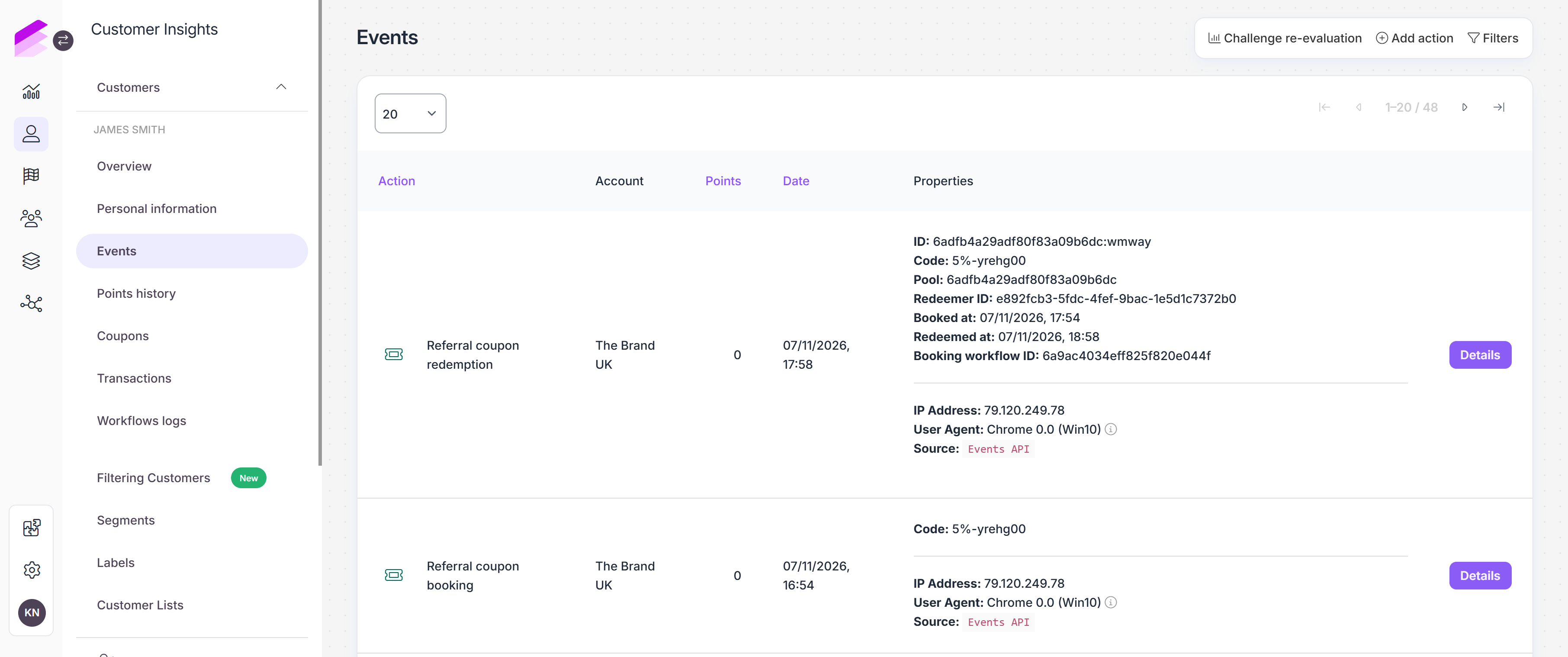
A referral coupon booking and referral coupon redemption events are registered in the referrer’s Event history.
Use this event to trigger a workflow that rewards the referrer for a successful referral by awarding bonus points, issuing a coupon, or granting a reward. The workflow can also let the referrer know through your marketing automation platform that their code was redeemed and, if they earned a reward, tell them what they received.
When the coupon is redeemed as part of the buyer’s checkout, it also records a Referral coupon claim (referral_coupon_claim) and a Coupon redeem (coupon_redeem) on the buyer’s profile.
If Auto-subscribe creates a profile for a previously unknown customer ID, the buyer’s events go on that new inactive profile.
Refunds
When Antavo processes a full refund for a loyalty member’s purchase, it releases the coupon. A redemption on a Shopify order processed without a buyer profile still counts toward the coupon’s usage limit after a refund. The referrer keeps any benefit already granted.
Example flows
These examples outline the configurations to combine. Adjust the triggers, eligibility conditions, and integrations to your program.
Email referral codes after a qualifying purchase
Required Antavo modules: Coupons, Workflows, Marketing automation integration
Coupon pool: create a percentage-based referral coupon pool offering 20% off.
Workflow: use an Event trigger for the purchase event and add any eligibility conditions.
Booking: add Book referral coupons, select the pool, and configure it to book three codes for each eligible purchaser.
Synchronization: add your chosen sync action after booking to send coupon and booking data to your communication platform.
Delivery and use: configure an email automation using the synchronized data and configure your storefront to accept the shared codes.
Redemption tracking: Enable Auto redeem and send the applied code in the Checkout event. Antavo records the Referral coupon redemption for the referrer when the coupon is redeemed.
Provide referral codes sent via webhook on a recurring schedule
Required Antavo modules: Coupons, Workflows, Trusted sites
Coupon pool: create a referral coupon pool for the intended discount.
Workflow: use an On a date trigger with a recurring schedule and any eligibility conditions.
Booking: add Book referral coupons, select the pool, and configure how many codes to book for each referrer.
Synchronization: add a Webhook message action after booking to send webhook messages with coupon and booking data to your own system.
Delivery and use: configure your customer account page to display the received codes for sharing and your storefront to accept them.
Redemption tracking: Enable Auto redeem and send the applied code in the Checkout event. Antavo records the Referral coupon redemption for the referrer when the coupon is redeemed.
Offer referral discounts in a Shopify store
Required Antavo modules: Coupons, Workflows, Shopify integration
Coupon pool: create a referral coupon pool for the intended discount.
Workflow: use an Event or On a date trigger with any eligibility conditions.
Booking: add Book referral coupons, select the pool, and configure the booking amount.
Synchronization: with the Shopify integration active, add Shopify Coupon Sync after booking and select the booked coupon variable and target shop.
Delivery and use: configure your storefront or communication platform to show or send the codes to referrers for sharing.
Redemption tracking: Enable Auto redeem and sync Shopify orders with their applied codes to Antavo. Antavo records the Referral coupon redemption for the referrer when the coupon is redeemed.
Check the flow
Before launching your friend referral flow, check the following in a test setup:
Review the booking result in the workflow log and the booking event on the referrer's profile.
Verify that the destination received the codes and settings. For Shopify, check Discounts and Outgoing logs.
Check that the Referral coupon redemption event is registered on the referrer’s profile when a purchase is submitted with a booked coupon code.