A plan represents a single loyalty concept you want to define. It acts as the workspace where you define the rules, structure, and components of your loyalty program.
Plans help you move from scattered ideas or external documentation into one clear, organized concept that can be refined step by step. This concept will later be used to generate your member journeys, refine how they work, and provide the basis for visualising your program on the Loyalty Map.
Creating a Plan
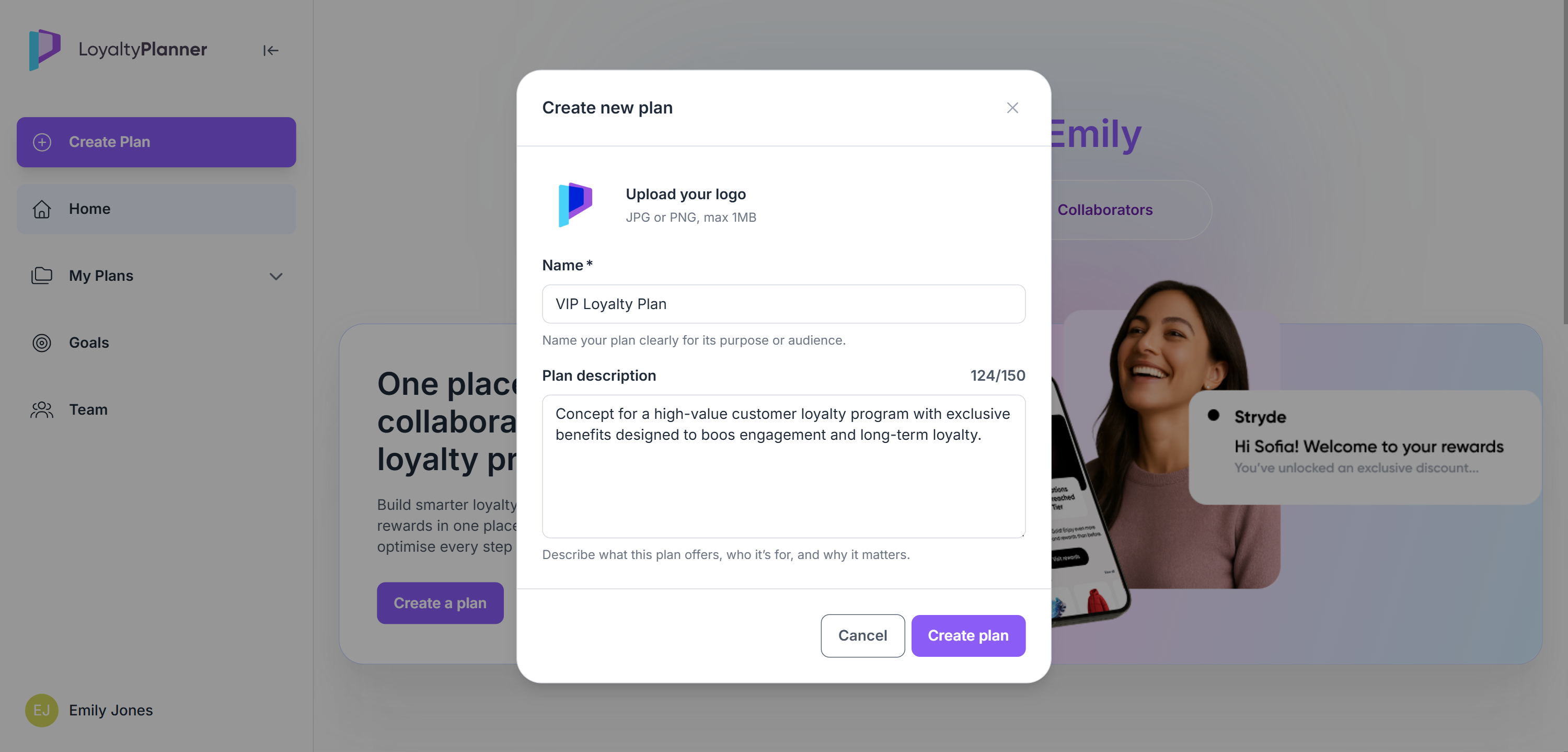
Click the Create a plan button on the Homepage or in the sidebar.
In the setup pop-up:
Upload your logo (optional)
Add a JPG or PNG that visually represents the plan.Enter the plan name
Give the plan a clear, descriptive name that reflects its purpose or audience.Add a description
Briefly explain what the plan covers and who it is designed for.
Click Create plan
Once created, you’re taken to the Plan Overview page. This is your starting point for defining and structuring your loyalty program.
Plan Overview
The Plan Overview page gives you quick access to the main tools and contextual information connected to your plan.
Quick Actions
Fast access to key tools such as the Loyalty Strategy Interpreter.Program Tools
Links to the core modelling features:
Concept Whiteboard, Loyalty Map and Journey Editor.Program Overview
This section helps you document the supporting information related to your loyalty program. Some items (like personas) can affect your program logic, while others serve as contextual information for planning and collaboration.
Use the buttons in each section to add, edit, or remove items.Countries: Markets where your program is available.
Channels: Sales or communication channels your program uses.
Personas: Member groups or segments that can be used in rewards and earning rules.
Technology: Systems connected to or supporting your loyalty program.
Documents: Any reference files or strategy materials you want to store, including any documents you uploaded through the Loyalty Strategy Interpreter.
Your team: People who have access to and collaborate on this plan.
.png)
Plan status
Every plan has a status that helps you organize your work:
Draft: The plan is still being designed and is not yet final.
Active: The plan is ready for review, presentation, or further modelling. Active plans cannot be deleted.
Use the Active / Draft toggle on the top right of the Plan Overview page to switch the status at any time.
The status does not affect functionality, it helps you manage and categorize your plans on the My plans page.
Loyalty Strategy Interpreter
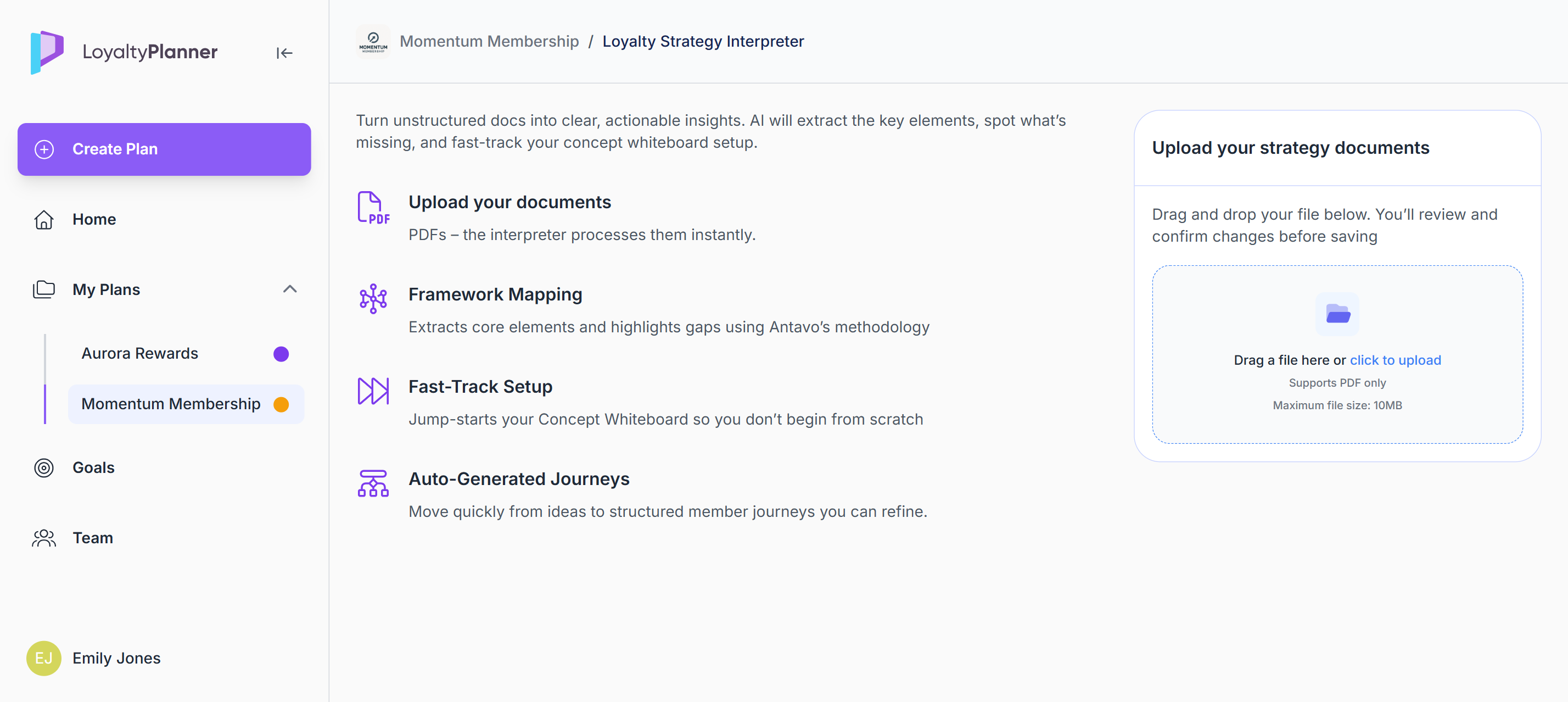
The Loyalty Strategy Interpreter is the recommended way to start building your concept, as it lets you make use of any existing loyalty documentation you already have. If you don’t have documentation yet, you can skip this step and go straight to the Concept Whiteboard to build your program manually.
Click the AI Uploader on the Plan overview page and use the Loyalty Strategy Interpreter to upload your PDF file.
The Loyalty Strategy Interpreter acts as the Planner’s AI-powered uploader. It reads your document as-is and extracts the elements, ideas, and settings that describe your program.
No specific structure or template is required
The AI works with whatever information is available.
May file size: 20 MB
Reviewing and verifying extracted content
After uploading, the Planner organizes the extracted information into structured sections.
You can:
review each section
set to Include or Skip,
and control what is imported into your Concept whiteboard
If a file cannot be processed, it will appear as failed in the upload list. You can upload a new file and restart the process at any time.
When finished, click Import to concept whiteboard to add the selected items to your plan.
If you want to use a different document instead, click Cancel to return to the upload step and add a replacement file.
.png)
Concept Whiteboard
You can access the Concept Whiteboard from the Plan Overview page under Program Tools.
If you used the Loyalty Strategy Interpreter, you’ll arrive here automatically after importing your content.
If you’re building your plan manually, this is your starting point for defining your loyalty program step by step.
The Concept Whiteboard works as a structured questionnaire that covers all the essential elements of a loyalty program: how members join, how they earn or progress, which rewards they receive, and the rules behind these experiences.
Each tab guides you through a specific part of the program, helping you make decisions step by step.
You can also consult Timi AI from the sidebar at any time. Timi acts as your loyalty strategy copilot who is able to answer questions about loyalty program structures, best-practice mechanics, and different ways to design effective earning, tier, or reward models. While Timi does not read or interpret what you are currently configuring on the Concept Whiteboard, you can use it to explore ideas, clarify concepts, or ask for guidance while you work.
Everything you configure on the Concept whiteboard here becomes the basis for generating member journeys and is later transformed into a visual representation of your entire program.
Before you start:
If you used the Loyalty Strategy Interpreter:
Some elements may already be pre-filled (including your program type and certain settings). You can review and adjust all fields as needed.If you are building manually:
You’ll start with empty sections and select your program type yourself. Each tab will reveal relevant fields based on your choices.
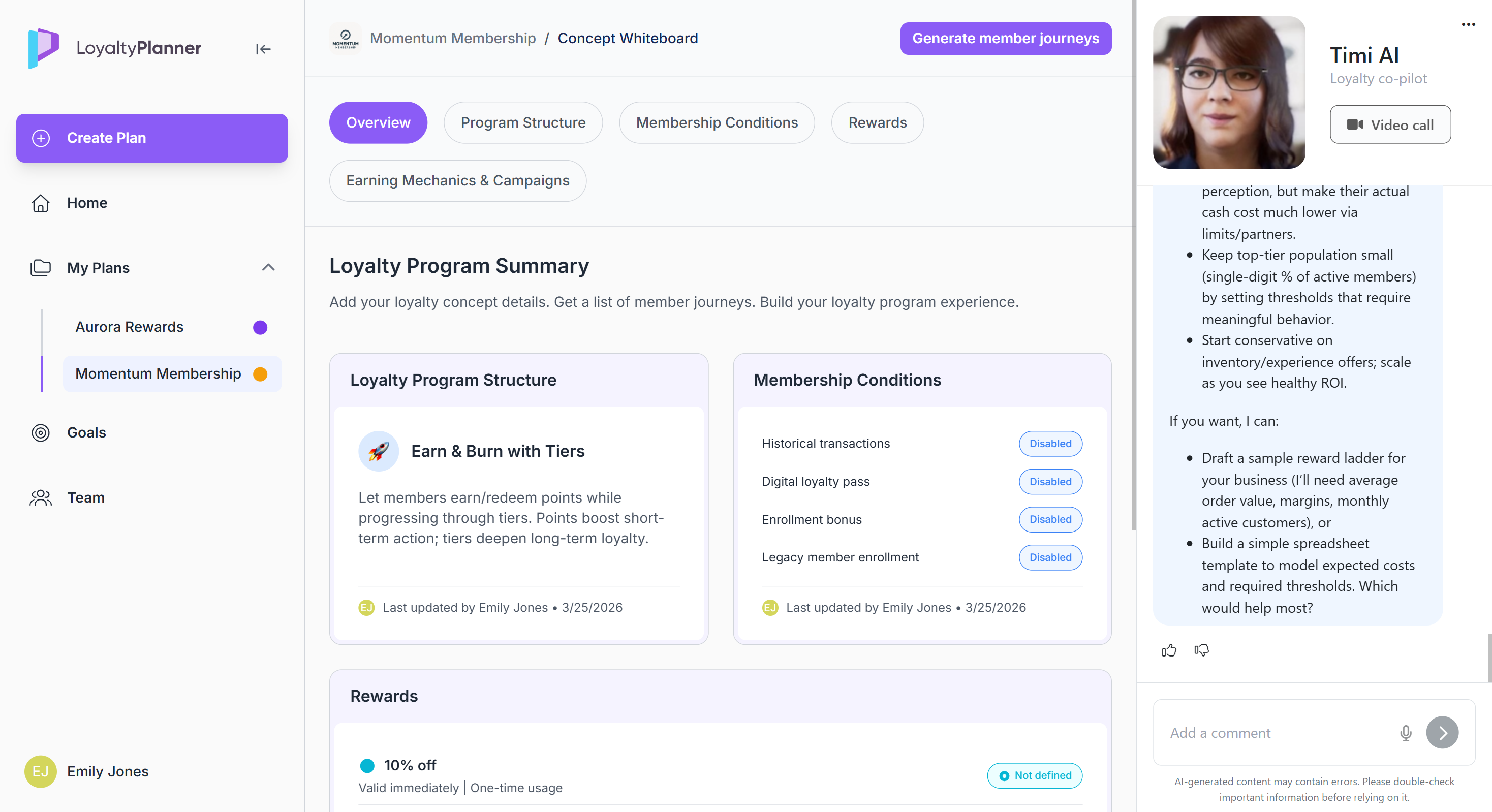
Overview
A high-level snapshot of everything you define across the other tabs. It updates automatically and serves as a quick way to review your concept before making further edits.
Program Structure
Define how your loyalty program operates at its core:
points, tiers, both, or neither
value rules
expirations
tier behavior
return handling, etc.
Membership Conditions
Control how members join the program and what happens at enrollment: welcome perks, past purchase handling, digital cards, legacy migration, and more.
Rewards
Define the benefits members can earn or redeem. This includes discounts, gifts, services, gamified rewards, recognition badges, or any other benefit you want to offer.
For each reward, you’ll be asked to:
choose a reward type,
name the reward,
set its usage rules (such as validity, redemption limits, or eligible personas)
Earning Mechanics & Campaigns
Define how members can earn points or unlock rewards. You can:
add earning mechanisms or campaigns
assign personas
select what you want to incentivize
specify the triggering action or occasion
decide whether members earn points or receive a reward
Generate member journeys
When your Concept Whiteboard is complete, click Generate member journeys.
The Planner uses your defined program structure, rules, and rewards to create an initial set of journeys.
A Member Journey is a structured outline of a specific member interaction in your program (such as joining, earning, redeeming, tier progression, or account changes) and defines the sequence of steps that make up that interaction.
Once journeys are generated, the Planner automatically redirects you to the Loyalty Map.
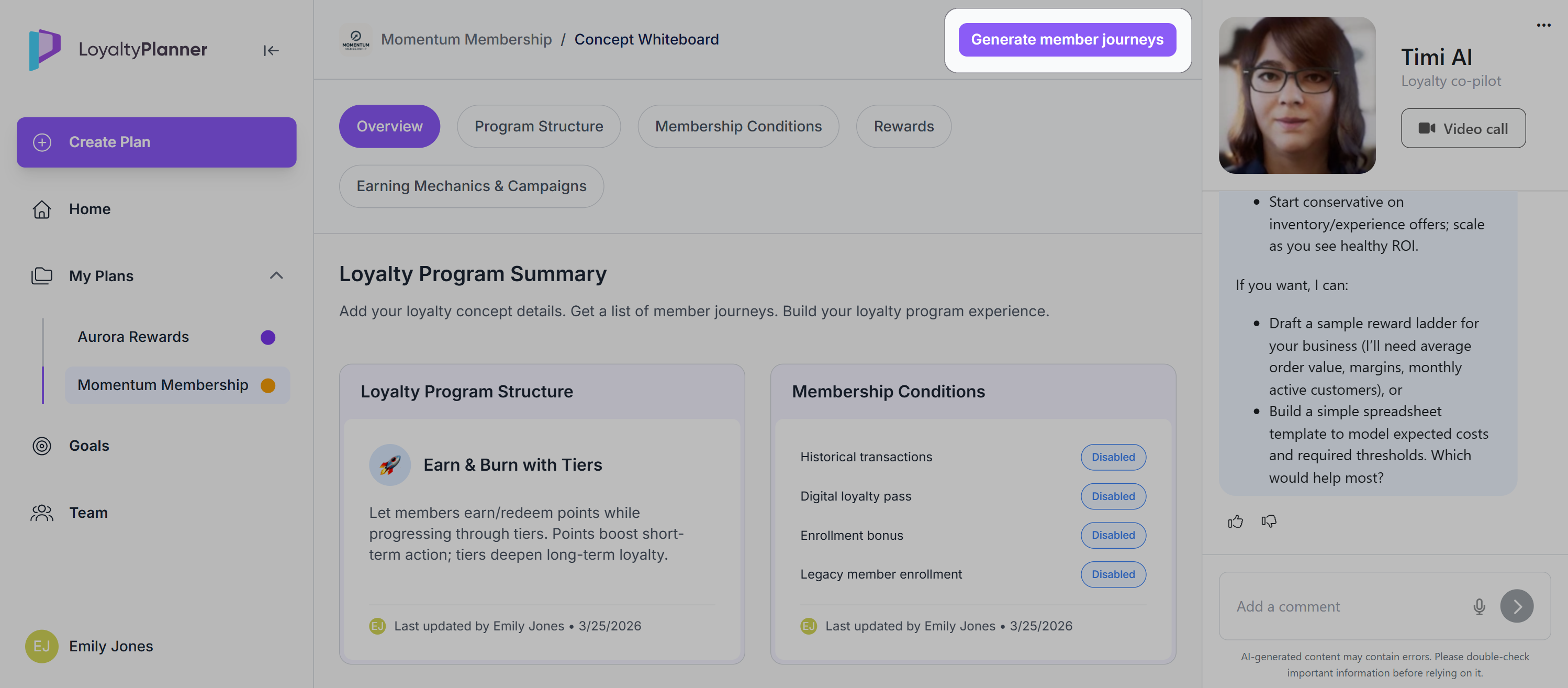
After journeys have been generated, you can still modify the concept. In this case, the Generate member journeys button changes to Update member journeys, which you can use to regenerate the journeys based on your changes.